
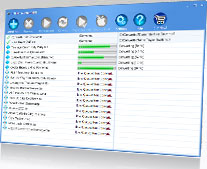
Supports ALL Formats
Rhapsody or any other format!


WMA to MP3
WMA to AAC
WMA to M4A
WMA to iTunes
WMA to iPod
WMA to WMA
WMA to WAV
M4P to MP3
M4P to AAC
M4P to M4A
M4P to iTunes
M4P to iPod
M4P to WMA
M4P to WAV
MP4 to MP3
MP4 to AAC
MP4 to M4A
MP4 to iTunes
MP4 to iPod
MP4 to WMA
MP4 to WAV
AAC to MP3
AAC to AAC
AAC to M4A
AAC to iTunes
AAC to iPod
AAC to WMA
AAC to WAV
RAX to MP3
RAX to AAC
RAX to M4A
RAX to iTunes
RAX to iPod
RAX to WMA
RAX to WAV
AA to MP3
AA to AAC
AA to M4A
AA to iTunes
AA to iPod
AA to WMA
AA to WAV
6 Most Frequently Asked Questions:
Q: Are program updates free?
A: Dear Customers! In order to provide you with better quality software experience we now offer paid major updates. This kind of paid major updates concerns new developments, added features that improve/change functionality of the program. Please note that minor program updates are still available for free of charge.
How to distinguish a paid major update from a free minor update? A major program update has a unique first number in the program version numbers assigned, e.g. SoundTaxi 3.4.8 differs from SoundTaxi 4.4.8, because the latter program version is a major update. A minor update version can be recognized by two numbers that follow the first number in the version name, e.g. SoundTaxi 4.4.8 and SoundTaxi 4.4.9 are minor updates, which are available for free to all customers.
Q: The software asks for a license code. Do I need a license code to try the software?
A: No. You can try the software trial version without a license code. It has 30 seconds conversion limitation for audio files and 3 minutes for video. After the program activation, it will convert your files completely.
Q: What kind of files can DRM Converter convert?
A: DRM Converter can convert any audio and video files that can be played in Windows Media Player, QuickTime Player and Real Player on your PC, e.g. DRM protected and non-protected WMA, M4P, AAC, WAV, MP3, OGG, OMA, OMG, ATRAC, WMV , M4V files etc. DRM Converter also supports Real Audio files and audio books.
Q: What output formats does DRM Converter support?
A: For audio conversion DRM Converter output formats are MP3, M4A (MPEG4 AAC), WMA and WAV, for video conversion — MP4 (MPEG4), WMV and AVI (DivX). Converted files can be played on any audio and video playing devices e.g. iPod, iPhone, Zune, any portable HDD and Flash MP3, MP4 players (Sony, iriver, SanDisk, Creative, Cowon, Samsung, Philips and many others), home DVD players, CD players, car audio and video, mobile phones etc.
Q: Why can’t I convert my files?
A: Please be sure you can play your files in Windows Media Player, QuickTime Player or Real Player (depending on the file type) on your computer. If you can do this, DRM Converter must convert these files.
Q: Can I use my DRM Converter's license code on multiple computers?
A: No, one license code can activate DRM Converter only on one PC.3